Release Notes - December 2025
This is a major update to AnyList that makes meal planning easier than ever!
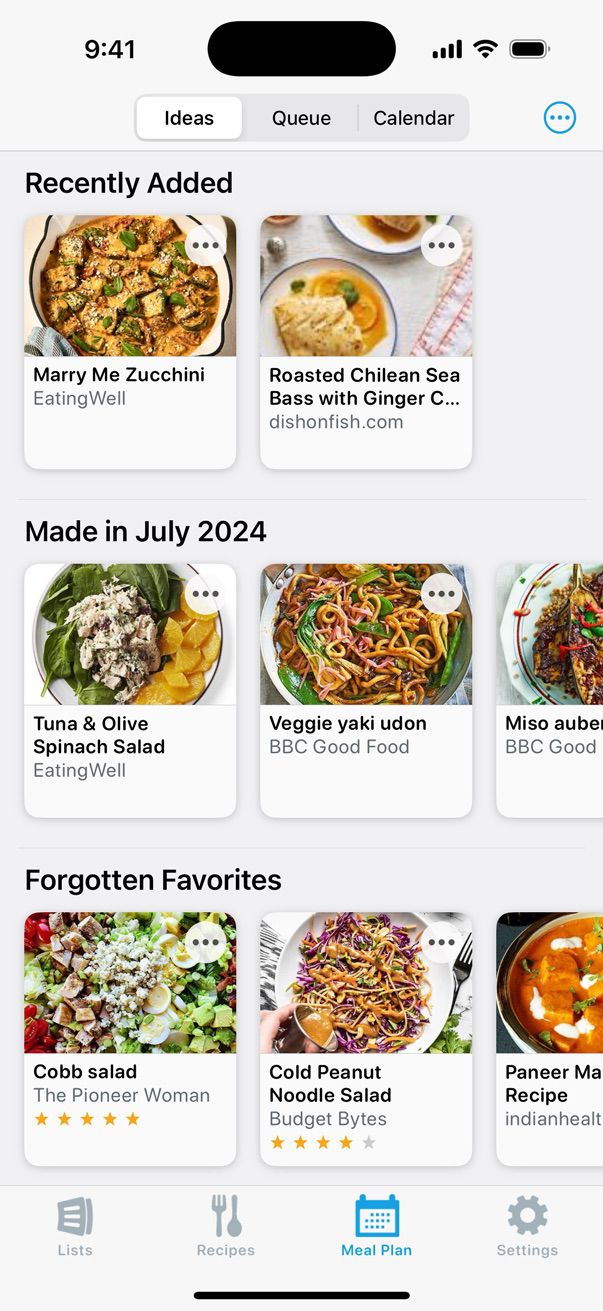
New features include a queue, personalized recipe suggestions, saved templates, the ability to search your meal plan, and much more.
These features are available now, across all platforms (iOS, Android, Mac, and AnyList for the Web)(iOS, Android, Mac, and AnyList for the Web).
Thank you for using AnyList! Please send any questions or feedback to team@anylist.com. We look forward to hearing what you think!
What’s New - Meal Planning
-
A Queue tab for collecting recipes you want to make soon, without needing to schedule them on your calendar.
-
An Ideas tab with personalized suggestions to help make deciding what to cook easier than ever.
-
Templates for easily reusing meal plans you follow regularly.
-
Pinned Entries for quickly adding frequently used recipes and notes to your calendar and queue.
-
The ability to search your meal planning calendar.
-
The ability to quickly jump to a specific month / year by tapping the month name at the top of the calendar.
-
The ability to choose an icon for meal plan notes.
-
The ability to include ingredients in a note that you can quickly add to your shopping list. Great for snacks and easy meals that don’t require a full recipe.
-
The ability to easily reuse meal plan notes when adding entries to your calendar or queue, either by searching or browsing.
-
The ability to easily add leftovers to your meal plan.
-
A ”First Day of Week“ app setting for specifying which day is shown as the first day of the week in the meal planning calendar.
What’s New - Recipes
-
A grid view for recipe collections that includes larger recipe photos.
-
New sorting options for recipe collections, including sorting by date prepared and number of times prepared.
-
An updated recipe details screen that includes the ability to view prep steps, notes, and previous / upcoming meal plan dates for a recipe.
Did this answer your question? If not, please search all of our articles. If you don’t find an answer, then contact us and we’ll be happy to help.